
SprigDeal is estimate and follow-up software for general contractors who quote residential improvement projects and coordinate several trades. Start from a ready-made general contracting estimate, adjust it to the job, send the customer a private link and let SprigDeal follow up automatically until they accept or decline.

How to win more general contracting customers with SprigDeal
- Send a professional estimate with phases and allowances; homeowners trust contractors who show how the price was built.
- Offer optional phases as separate estimates so customers can start with what fits their budget.
- Follow up after 5–7 days and offer a short call to walk through the scope.
Start from a general contracting estimate template
New general contracting estimates in SprigDeal open with this starter template. Every line, quantity and price is editable; the amounts are examples, not price recommendations.
| Residential improvement project | Qty | Example price |
|---|---|---|
| Site visit and planning | 1 | $180 |
| Project labor | 4 | $2,200 |
| Materials allowance | 1 | $1,200 |
| Example total | $3,580 |
Project management, labor and material allowances for proposed work.
What should a general contracting estimate include?
- Site visit, planning and project management.
- Labor by phase or by trade.
- Material allowances, clearly labelled as allowances.
- Permits, inspections and dumpster or disposal fees.
- Payment milestones and what is excluded from the scope.
When to follow up on a general contracting estimate
Larger projects often wait on financing, design decisions or other bids. Follow up after 5–7 days, and use the follow-up to offer a short call about the scope. In SprigDeal you set the follow-up date per estimate, and the reminder email is cancelled automatically if the customer decides first.
How SprigDeal works for a general contracting business, step by step
This is the complete workflow, from the first quote to the customer’s decision. Every step works in the browser on a phone, tablet or computer, so you can quote on site or at the office.
1. Create the general contracting estimate
- Choose the customer, or add a new one with name, email and phone.
- Pick General Contracting as the trade and the estimate opens with the “residential improvement project” template above. Edit, add or remove line items with quantity, unit and price.
- Apply tax, a discount and a deposit percentage. Your defaults come from your workspace settings and SprigDeal totals everything automatically.
- Write the scope of work, exclusions and terms, set how long the price is valid and add the project address. The address only appears on customer links and PDFs if you turn that on.
2. Send it to the customer
- Share privately emails the customer a private link to a mobile-friendly estimate. Replies go to your business email.
- Download PDF saves a branded PDF with every line, the totals, deposit, exclusions and terms, ready to print or attach to your own email. On a phone you can also share the PDF directly.
- Duplicate copies an estimate for a similar general contracting job, so repeat quotes take seconds.
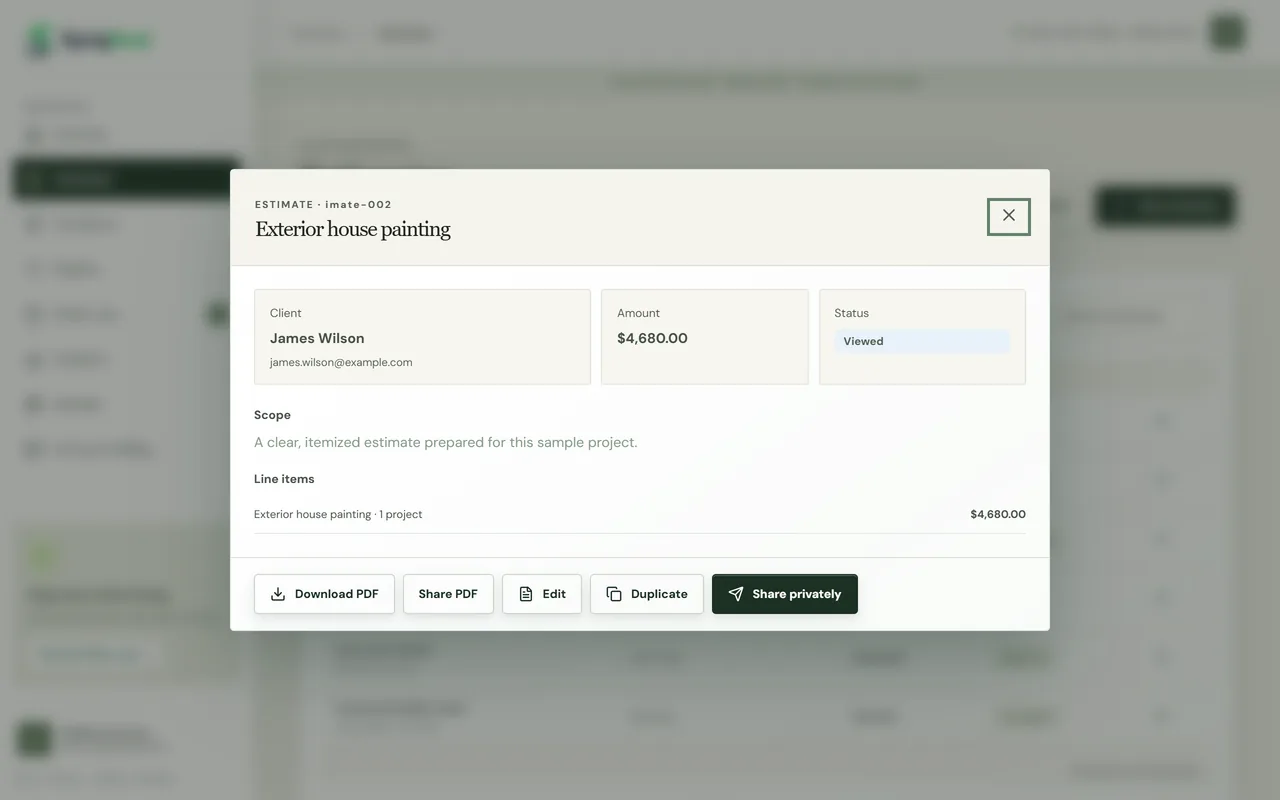
3. Monitor every estimate you sent
- Each estimate has a status: Draft, Sent, Viewed, Accepted or Declined. It changes to Viewed automatically the first time the customer opens the link, so you know they have seen your price.
- The pipeline shows every estimate in a column by status, and the overview shows won revenue, open estimate value, acceptance rate and active estimates.
- Analytics breaks down revenue by service, and the customer list shows total and repeat customers and quotes in progress.
- Search and filter estimates by status or service to find any general contracting quote in seconds.
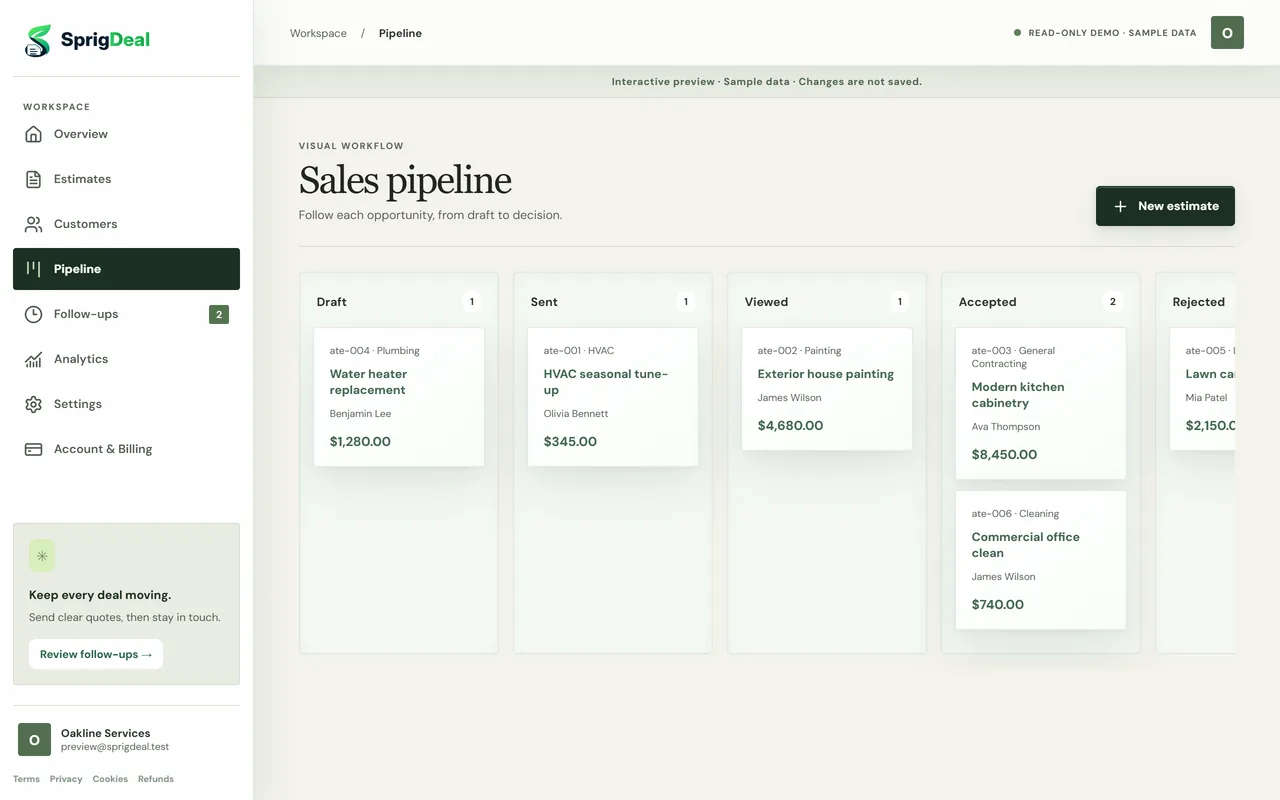
4. The customer decides online
- The customer opens the link on any device, with no app or account, reviews every line and can download the PDF.
- They tap Approve estimate or Decline estimate. The decision is recorded for that exact version, and you get an email right away.
- Need to change the price after sending? Create a new revision as a draft and send it again; approvals always refer to the version the customer saw.
Want to see it as your customer does? Open the sample estimate and try the PDF and approval buttons; nothing is saved.
5. Follow up without chasing
- Every estimate gets a follow-up date, set by default from your workspace’s follow-up delay.
- If the customer has not decided by then, SprigDeal emails one polite follow-up with the link to the estimate.
- If they accept or decline first, the follow-up is cancelled automatically. You can also snooze it two days or mark it done.
SprigDeal focuses on estimates, follow-ups and customer decisions. It does not handle dispatching, scheduling, invoicing, payments or payroll. See how estimates work, how follow-ups work or browse all supported industries.
Frequently asked questions
What should a general contractor estimate include?
Include planning and project management, labor by phase, material allowances, permits and disposal, payment milestones and exclusions, with the total and how long the price is valid.
Can I send one estimate per project phase?
Yes. You can send a separate estimate for each phase, each with its own link, or keep everything on one estimate with a line item per phase.
How much does SprigDeal cost for a general contracting business?
SprigDeal has one plan for every trade: $29.99 USD per month or $299.90 USD per year, with taxes calculated at checkout. You can cancel anytime.